Creating a sitemap is an essential strategy for enhancing your website’s visibility and performance in search engine results. A sitemap serves as a roadmap, guiding search engines like Google and Bing to index your website’s content effectively.
Implementing a WordPress Sitemap ensures search engines can discover, prioritize, and rank your key pages, boosting your SEO and increasing organic traffic.
What is a WordPress Sitemap?
A WordPress Sitemap is a structured file that organizes and lists the key pages of your website. It helps search engines efficiently index your content, improving your site’s discoverability.
Creating a WordPress Sitemap ensures your essential pages are easily found by search engines, boosting your search rankings.
It is two primary types of sitemaps:
XML Sitemaps:
XML sitemaps are structured in XML and are primarily designed for search engines. They provide detailed information about your website’s pages, images, and videos, helping search engines like Google and Bing index your content more effectively.
HTML Sitemaps:
HTML sitemaps are designed for human visitors and provide a clear, organized overview of your website’s structure. They make it easier for visitors to find specific information, enhancing overall navigation.

Types of Sitemaps

Let’s take a closer look at the different types of sitemaps.
XML Sitemaps: (for search engines)
XML sitemaps are essential for communicating vital information about your website to search engines. They indicate the importance of each page and the frequency of updates.
Here’s how they operate:
Every URL on your site is included, enabling search engines to locate and access each page quickly. XML sitemaps also inform search engines about the last modification date of the pages, helping them prioritize crawling newly updated content.
The update frequency section indicates how often search engines should revisit certain pages based on your update schedule.
Additionally, XML sitemaps allow you to assign relative importance to various pages, guiding search engines to focus on the content you consider most valuable.
Furthermore, specialized WordPress XML sitemaps exist for different content types.
Image sitemaps: A WordPress image sitemap is essential for helping search engines locate and index the images on your website, significantly boosting your visibility in image search results.
Video sitemaps: A WordPress video sitemap provides crucial details about your video content, such as titles, descriptions, and durations, ensuring your videos appear prominently in relevant searches.
News sitemaps: Specifically crafted for news websites, this type of sitemap empowers Google News to efficiently index and display your articles, maximizing your reach and audience engagement.

HTML Sitemaps: (for users)
HTML sitemaps are essential for human visitors. They provide an organized overview of your website’s structure, significantly enhance navigation, and enable users to find specific sections or pages easily.
Enhanced User Navigation: An HTML sitemap functions as a definitive table of contents, efficiently guiding users through the main sections of your WordPress site. This tool is crucial for more significant sites with extensive content.
Footer Placement: Positioning HTML sitemaps in the footer of your website is a strategic choice, as it offers an accessible navigation tool for users exploring your WordPress site for the first time.
Why is WordPress Sitemap Important?

A well-structured WordPress Sitemap plays a crucial role in Sitemap Optimization by improving SEO, indexing speed, and user experience. Below are some key benefits:
Enhanced SEO
Sitemaps are an essential SEO tool that empowers search engines to comprehend your site’s content, context, and structure more efficiently. This clarity results in better rankings and enhances your overall visibility.
Sitemaps enable search engines to evaluate relevance more accurately by providing a clear view of your content and page hierarchy, improving your rankings for specific keywords.
As search results rankings improve, sitemaps are crucial in driving more organic traffic to your WordPress site.
A well-structured sitemap enhances the user experience and leads to higher click-through rates from search engine results pages (SERPs).

Quick Indexing of New Content
A sitemap is essential whenever you add fresh content, as it directs search engines to new or updated pages for quicker indexing.
Updating your sitemap is a powerful way to notify search engines to prioritize crawling your latest content, ensuring it appears in search results immediately.
Pages listed in your sitemap are far more likely to be indexed promptly, keeping your content visible and highly relevant.
Moreover, consistently updating your sitemap clearly signals to search engines that your site is active, compelling them to revisit and reindex your content regularly.
Enhance Indexing and Crawling
Sitemaps are essential tools that serve as a roadmap for search engine crawlers, directing them to discover and index your website’s pages.
They are particularly critical when pages are difficult to find due to complex navigation or limited internal linking.
Large or complex sites, such as eCommerce or news platforms with extensive archives, must utilize sitemaps to ensure that all pages are easily discoverable.
Furthermore, for sites that frequently update with new products or blog posts, a sitemap is critical to enabling search engines to stay current and index new pages promptly.
In cases of weak internal linking, a sitemap is a vital resource that directs crawlers to pages that might otherwise go unnoticed.
This enhanced crawling efficiency is crucial for making all valuable content on your site accessible to search engines, leading to improved visibility and indexing.
Improve User Experience
XML sitemaps inform search engines, but HTML sitemaps are essential for enhancing user experience. They significantly improve website navigation and usability.
HTML sitemaps deliver a structured overview of your website, enabling users to locate specific content swiftly.
Users who can effortlessly find what they need are far more likely to remain on your site, lowering bounce rates.
A well-designed sitemap directly encourages visitors to delve deeper, allowing them to engage more fully with your content and offerings.
Implementing an HTML sitemap is a powerful strategy for elevating user interaction and satisfaction on websites with diverse sections or complex layouts.
It’s not just a nice-to-have; it’s a vital component of a successful website.
Organization and Planning
Creating a sitemap is essential for structuring your website’s layout effectively. It enables you to design an optimized site that significantly boosts both SEO and user experience.
A sitemap compels you to assess your site’s hierarchy, clearly identifying which pages are crucial for search engines and users alike.
A thoughtfully crafted sitemap ensures a logical flow, dramatically enhancing user navigation.
With a comprehensive overview of your site, you can decisively determine the best placement for content and links, directly aligning your website layout with your business objectives.

How to Create a WordPress Sitemap using Sitemap Plugins
There are several effective plugins that can automatically generate a WordPress sitemap for your website. Among the most popular and reliable options are:
Rank Math SEO:
A powerful tool that allows easy sitemap optimization with advanced features. It includes comparable to Yoast SEO, empowering you to optimize your sitemap and take full control over how your content is presented to search engines.
Yoast SEO:
A powerful SEO plugin featuring an automatically generates an XML sitemap and allows customization. It enables customization of your sitemap by including or excluding specific post types, taxonomies, and even particular posts or pages.
Jetpack:
A versatile plugin that includes a built-in sitemap feature. It’s an excellent choice if you’re already using Jetpack for other functionalities like security or performance enhancement.
Google XML Sitemaps Plugin:
This powerful lightweight plugin is specifically crafted to generate XML sitemaps efficiently. It autonomously creates a sitemap and promptly notifies major search engines like Google, Bing, and Yahoo about any updates to your site.
Create a WordPress Sitemap without a Plugin
Creating a sitemap manually is an effective option for those who choose not to use plugins. Here’s a definitive guide on how to manually create a WordPress XML sitemap and seamlessly integrate it with your site:
Make Sitemap in a Text Editor
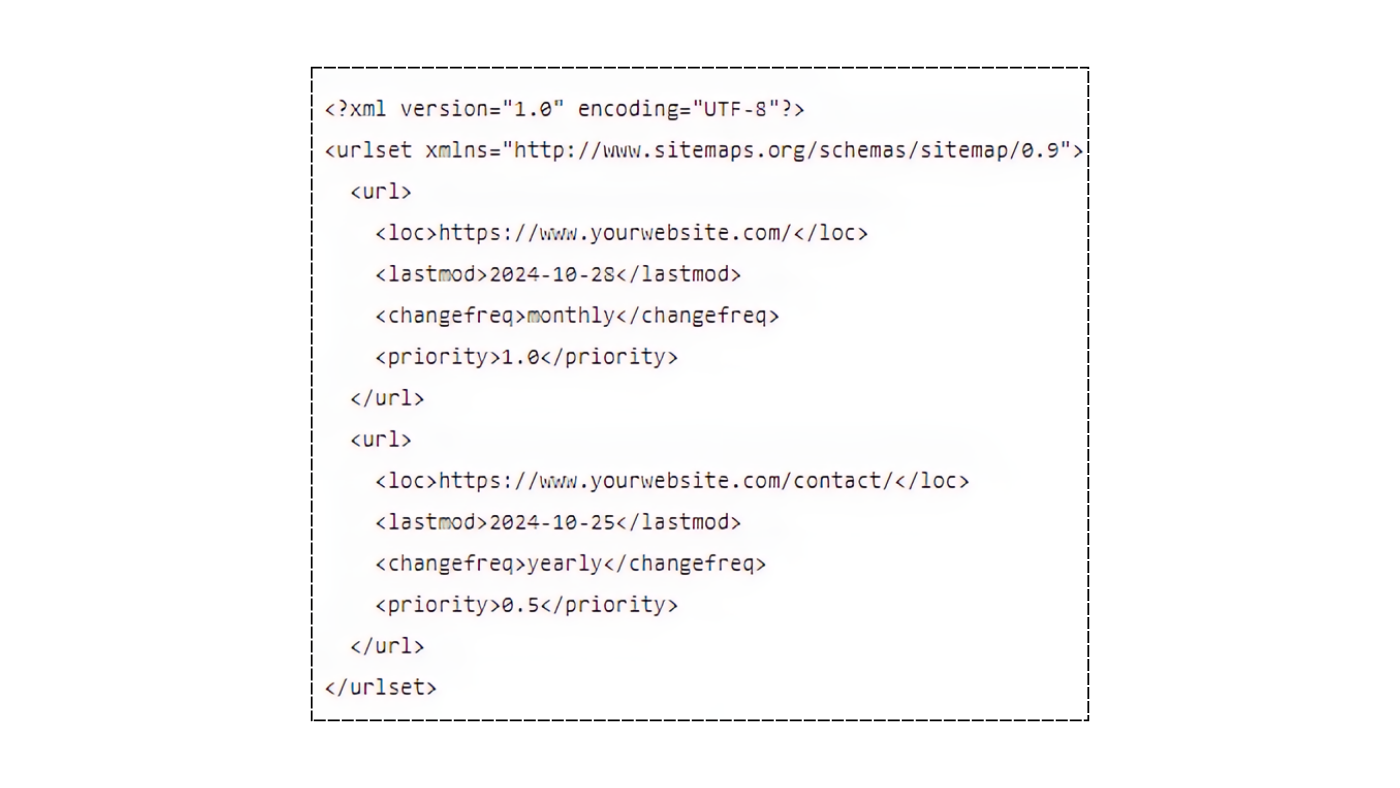
Open a text editor, such as Notepad or TextEdit, and begin by writing the XML code that lists the pages you wish to include.
Customize Page’s Details
Ensure that you customize each <url> section by updating the URL, last modification date, update frequency, and priority. This is essential for guiding search engines in prioritizing the pages to crawl.
Save the file as file name sitemap.xml
To maximize your website’s visibility, save your XML file as sitemap.xml in plain text format. To ensure optimal performance, ensure there are no formatting issues.
Upload sitemap.xml to Website’s Root Directory
Access your website’s file structure using an FTP client or your web hosting file manager. Ensure you upload the sitemap.xml file directly to the root directory, usually public_html. Doing this will allow search engines to locate it automatically without any issues.
Acknowledge to Search Engines
Submit your sitemap via Google Search Console and Bing Webmaster Tools to encourage search engines to crawl your site more efficiently.
Additionally, consider adding the following line to your robots.txt file to enhance the visibility of your sitemap: https://www.yourwebsite.com/sitemap.xml
Add and Create a Static WordPress Sitemap
Static sitemaps are the ideal solution for smaller websites or those with a fixed structure, granting you precise control over the pages you include. Follow these steps to manually create a static XML sitemap and add it to your website:
Navigate to Text Editor
Begin by opening a straightforward text editor such as Notepad (Windows) or TextEdit (Mac). Ensure you switch to plain text mode, if needed, to maintain a clean file without any formatting.
Write XML code
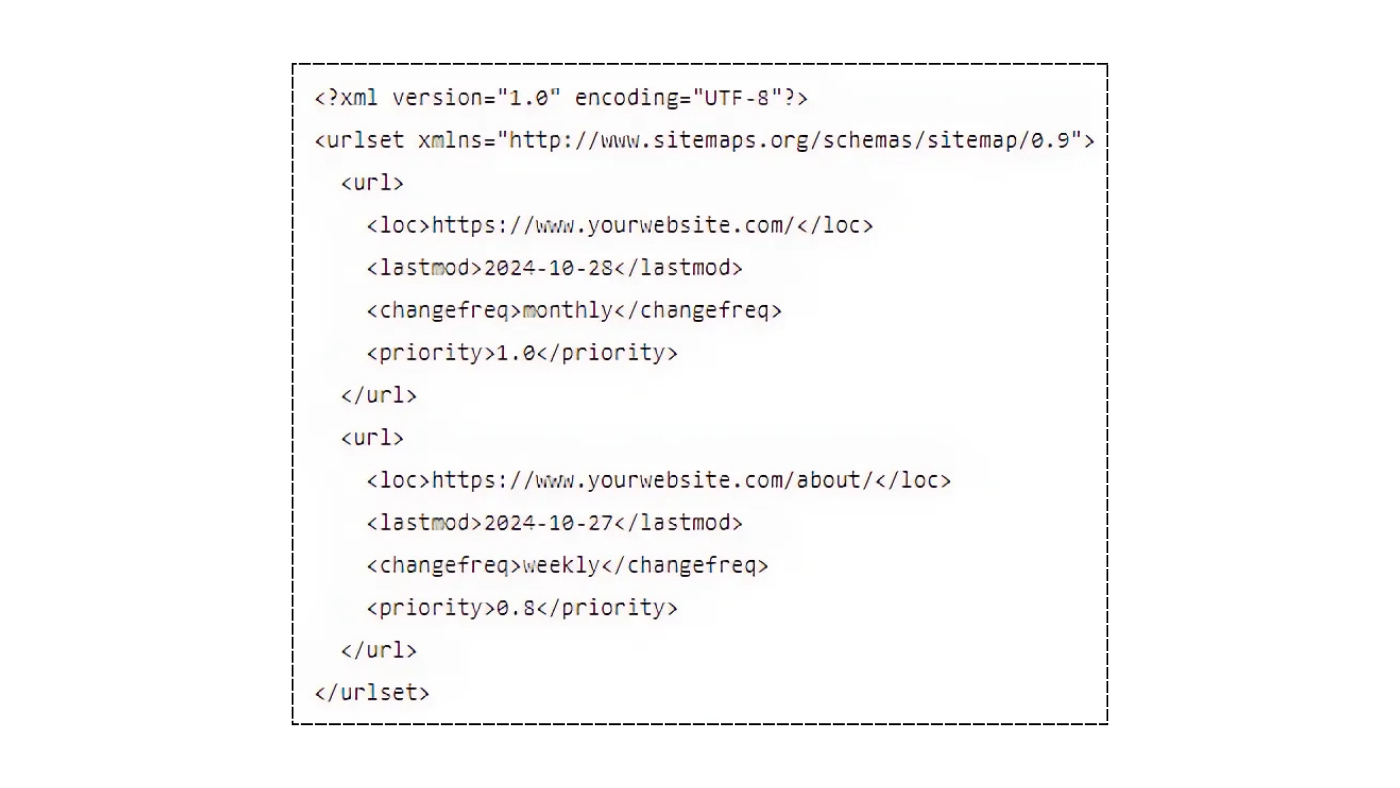
Write the below-mentioned code for the sitemap:
Customize the XML
To customize the URLs, replace them with the ones of the pages you wish to include. Adjust the `(lastmod)`, `(changefreq)`, and `(priority)` tags as necessary:
`(lastmod)` should indicate the last modification date of each page.
The `(changefreq)` tag indicates how often the page’s content is updated (for example, daily or monthly).
The `(priority)` tag ranges from 0.0 to 1.0, with 1.0 representing the highest priority.
Save the File as sitemap.xml
Save the file as sitemap.xml, ensuring there are no extra spaces or special characters in the filename.
Upload sitemap.xml to Website’s Root Directory
To upload sitemap.xml to your website’s root directory, use an FTP client like FileZilla or the file manager provided by your hosting service. Typically, the root directory is found in the public_html folder.
Acknowledge and Submit to Search Engines
You can check your WordPress sitemap’s availability by visiting: https://yourwebsite.com/sitemap.xml.
Submit your WordPress sitemap through platforms like Google Search Console and Bing Webmaster Tools to ensure search engines can find it.
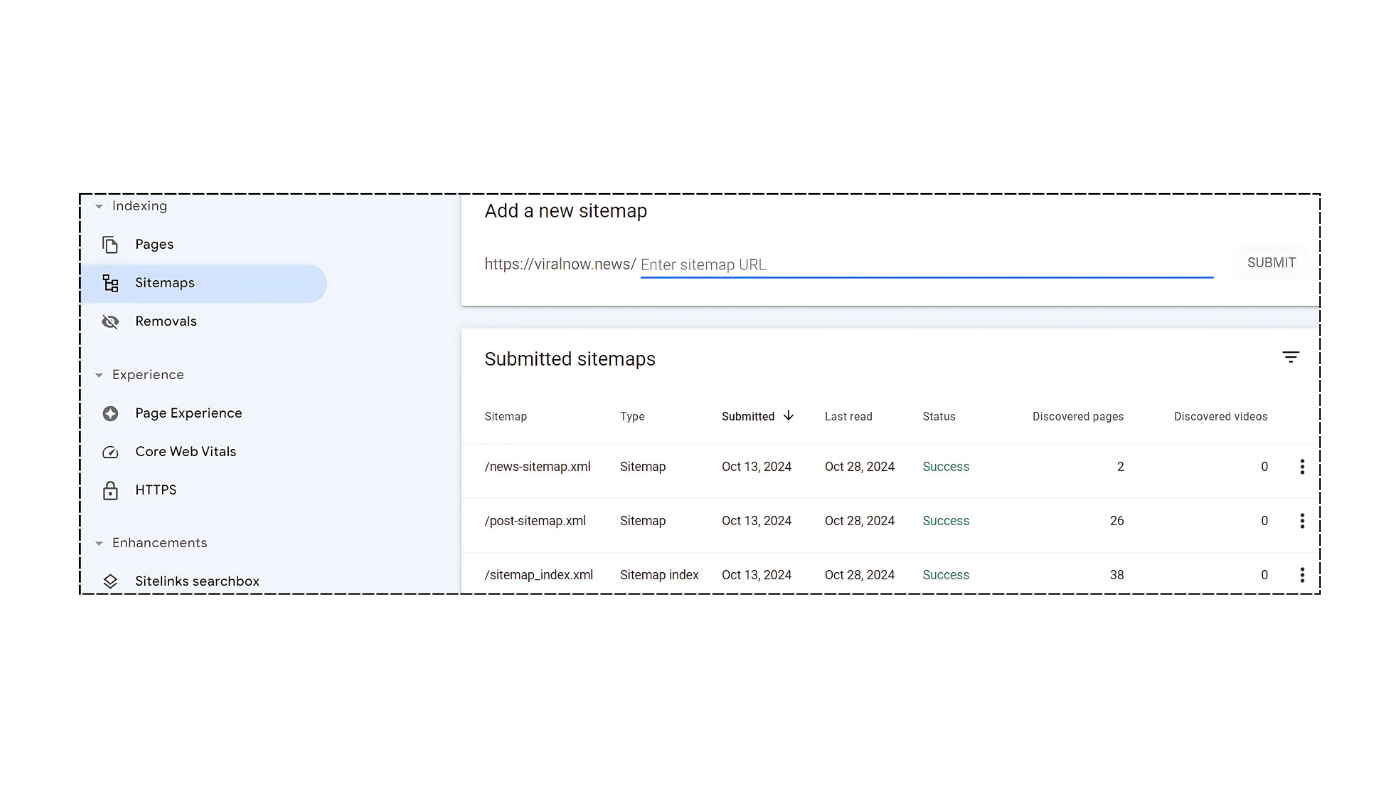
Submitting WordPress Sitemap to Google
Congratulations on completing your sitemap! Now, it’s crucial to ensure that search engines, particularly Google, can access it seamlessly to index your website effectively.
Google Search Console:
Google Search Console allows you to manage how your site appears in Google’s search results and serves as the primary platform for submitting your sitemap. Here’s a procedure to guide you on how to do it:
1. Sign in to Google Search Console:
If you’re just starting with Search Console, take the important step of creating an account and verifying that you own your site. This will unlock valuable insights to enhance your online presence.
2. Choose your property:
Select the website where you would like to submit the sitemap.
Go to “Sitemaps”:
Locate Index >> Sitemaps, On the left-hand side menu.
3. Add your Sitemap URL:
In the “Add a new sitemap” field, you must enter the part of the URL that comes after your domain, such as sitemap.xml or sitemap_index.xml.
For example, if your sitemap URL is https://www.yourwebsite.com/sitemap.xml, only enter sitemap.xml.
Press “Submit” to allow Google to process your sitemap efficiently, enhancing its bots’ ability to crawl your website easily.
Robots.txt: A subtle invitation for search engine bots to navigate your site
Your robots.txt file is essential for guiding search engine bots, directing them on which parts of your site to crawl and which to avoid.
While adding your sitemap URL is optional, it is highly recommended, as it ensures that bots can find it without any issues.
Make sure to add your WordPress sitemap to the robots.txt file:
Find your robots.txt file: This file is typically located in the root directory of your website, which is usually named public_html.
Include your sitemap URL: Ensure you add the following line at the end of your file:
Sitemap: https://www.yourwebsite.com/sitemap.xml. Don’t forget to replace it with your actual sitemap URL for better site visibility.
Save and upload: Once you’ve made the necessary updates, save the file and upload it to the root directory of your website.
This ensures that your changes take effect and your site is properly indexed.
For WordPress Sitemaps Best practices
Only Use Canonical URLs:
Only include the preferred versions of URLs in your sitemap to eliminate duplicate content. This is crucial for search engines to accurately identify and prioritize each page.
Submit to Other Search Engines:
Don’t restrict your submissions to Google. It’s crucial to submit your sitemap to other search engines like Bing and Yahoo to maximize your site’s visibility.
Keep Sitemap up-to-date:
Constantly update your sitemap immediately after adding or removing web pages. This is crucial to ensure search engines have the most current structure and content at all times.
For Large Websites Use a Sitemap Index:
When your site has several sitemaps—often necessary for larger sites—it’s essential to create a sitemap index file. This file effectively organizes the sitemaps and references each one, streamlining the process for search engines to crawl complex structures.
Bottom Line
A WordPress Sitemap is essential for maximizing your website’s visibility, SEO, and user experience. Whether using plugins like Rank Math SEO Plugin or creating one manually, a well-optimized sitemap ensures search engines effectively index your content.
Keep your WordPress Sitemap updated and follow best practices for long-term success. Start optimizing your site today and improve your search rankings!
For more information, check out on Hostinger.
FAQs
What is a WordPress sitemap?
A WordPress sitemap is a structured file that lists your website’s key pages. It helps search engines like Google and Bing find, index, and rank your content, improving your site’s visibility and search engine optimization (SEO).
Why is a WordPress sitemap important?
A WordPress sitemap helps improve SEO by making it easier for search engines to index your content. It also ensures quicker indexing of new pages and improves user experience by organizing the website’s structure for easier navigation.
How can I create a WordPress sitemap?
You can create a WordPress sitemap using plugins like Rank Math SEO, Yoast SEO, or Jetpack. Alternatively, you can manually create one by writing XML code in a text editor and uploading it to your website’s root directory.
What’s the difference between an XML sitemap and an HTML sitemap?
An XML sitemap is designed for search engines and helps them quickly index your site’s pages, images, and videos. An HTML sitemap, on the other hand, is for human visitors. It provides a clear and organized list of your site’s pages to help users navigate easily.
How do I submit my sitemap to Google?
After creating your sitemap, you can submit it to Google through Google Search Console. Simply sign in, go to the “Sitemaps” section, and add your sitemap URL. Additionally, you can include the sitemap URL in your website’s robots.txt file to help search engines find it.